

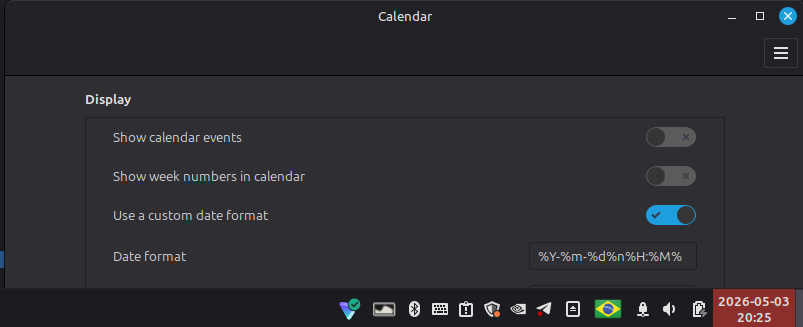
ISO8601-based custom date format in Linux Mint
Right-click the calendar widget in the panel > toggle Use a custom date format > Add %Y-%m-%d%n%H:%M% to the field below.
Seconds omitted because I don’t have use for them, and %n to put the hours and minutes in a second line, so it’s easier to read.
Didn’t test in other Debian-based systems. And iirc changing the locale to either Danish or Japanese also works, but then the system won’t be in English.
Hope this helps someone. =)
#iso8601 @[email protected]
I didn’t know about
%n, but otherwise I’ve been using this.I’m disappointed that my world clocks broke and only display UTC after upgrading to LMDE 7.