I’m a big fan of Mint specifically because they spent so much effort making just about everything accessible from a user friendly GUI. I totally agree with you, every time I see this kind of thing online I die a little.
Most people don’t want to become an expert in the task they want to do. They just want to do it once. CLI tools demand expertise.
Unfortunately in Linux, UI tools often take away some of the transparency you get with the CLI tools they’re made for.
I’ve recently tried setting up a VPN connection to my workplace using the EndeavourOS configuration UI. It basically just said “can’t connect, haha, fuck you”, so I had to dig deeper. Finding out how to use the CLI commands necessary to identify and fix the problem took some time and effort, but in the end, I managed to set it up successfully (turned out most Windows admins still think l2tp is hot shit while the Linux world considers it obsolete).
In this case, UI wasn’t as user friendly as CLI, because it hid vital information that was necessary to solve the problem.
A better UI would probably have solved that problem quicker and easier. In an ideal world, you get intuitive GUI tools that cover all use cases and you still have the option to use the CLI if you want to dig deeper. So yeah, I agree with the point you’re making - Mint trying to be as user friendly as possible by offering accessible UI tools is a good thing and one of the reasons why Mint is so popular. (It’s also a reason why Windows sucks ass, because for most UI things the CLI equivalent is either non-existent or cryptic as hell…)
The point I’m making - GUI tools should always try and make using the CLI unnecessary. Taking away complexity without taking away functionality is the key, and as a consequence, those GUI tools will not be underappreciated for sure.
It definitely is, and yes, you’re right, I should open a bug report.
But then again, you could make the argument that a user-friendly OS shouldn’t require developer level expertise that’s necessary for opening bug reports in the first place. After all, bug reports require a certain quality level that’s not obvious to newbies (like how to reproduce et cetera).
I’ve noticed this problem as well, as a Linux novice. I stick mostly to GUIs, but a few times I’ve had to figure out the command line equivalent for whatever I’m trying to do because the gui program would just close and provide no further feedback. Then I get to the same step in the command line and it gives me a whole paragraph of explanation about why it failed and how I can fix it. This info should’ve been available in the gui version, maybe like a popup error message in windows
It all comes down to how complete and good the tool is, both for CLI and for GUI. I’ve seen GUI tools that give more information than the equivalent CLI, and of course I’ve also seen the opposite as you have.
What grinds my gears the most though is when there’s no tool at all, you need to edit some config file, and the instructions given are nano /path/file.conf (or, god forbid, vim). It’s a text editor, why not use a normal one?! There are no guardrails either way to ensure the format is correct!
Obviously in that scenario someone should make an interface to edit the config safely, be it GUI or CLI, but that’s another matter.
Speaking of which, the latest Mint released ~yesterday added a GUI to make common edits to the grub bootloader. See: https://www.linuxmint.com/rel_zena_whatsnew.php “System Administration”. I am not aware of any CLI that can do this, I think before this you had to edit a text file and hope you got it right. At least as far as common recommendations go.
I agree on CLI text editors. I get why they exist, but for most users they should be a last resort, not the primary instruction.
Instead of telling people to use Nano, just tell people to edit the .conf in a text editor and let them choose!
Many users won’t understand that what they’re being told to do with Nano is literally just edit a text document with a funky file extension, and that they don’t actually have to that it in CLI (in-fact it might even be easier not to if you’re not familiar with them).
Exception for helping someone who sshed into something and doesn’t understand what they are doing.
It happens that someone without knowledge has no idea how to interactively edit a file on a system they can only ssh into. ‘run nano’ is easier than ‘ok, now I’ll show you how to WinSCP the file down edit it, and put it back, but make sure you don’t screw up the CRLF or permissions in the process…’


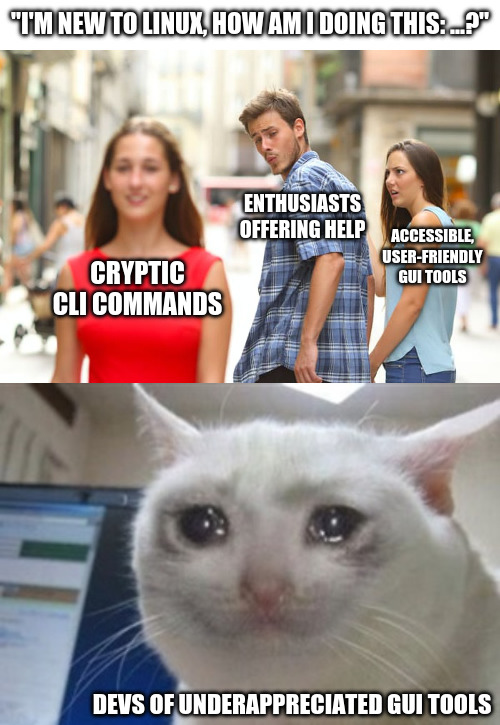
I’m a big fan of Mint specifically because they spent so much effort making just about everything accessible from a user friendly GUI. I totally agree with you, every time I see this kind of thing online I die a little.
Most people don’t want to become an expert in the task they want to do. They just want to do it once. CLI tools demand expertise.
Unfortunately in Linux, UI tools often take away some of the transparency you get with the CLI tools they’re made for.
I’ve recently tried setting up a VPN connection to my workplace using the EndeavourOS configuration UI. It basically just said “can’t connect, haha, fuck you”, so I had to dig deeper. Finding out how to use the CLI commands necessary to identify and fix the problem took some time and effort, but in the end, I managed to set it up successfully (turned out most Windows admins still think l2tp is hot shit while the Linux world considers it obsolete).
In this case, UI wasn’t as user friendly as CLI, because it hid vital information that was necessary to solve the problem.
A better UI would probably have solved that problem quicker and easier. In an ideal world, you get intuitive GUI tools that cover all use cases and you still have the option to use the CLI if you want to dig deeper. So yeah, I agree with the point you’re making - Mint trying to be as user friendly as possible by offering accessible UI tools is a good thing and one of the reasons why Mint is so popular. (It’s also a reason why Windows sucks ass, because for most UI things the CLI equivalent is either non-existent or cryptic as hell…)
The point I’m making - GUI tools should always try and make using the CLI unnecessary. Taking away complexity without taking away functionality is the key, and as a consequence, those GUI tools will not be underappreciated for sure.
You should open a bug report saying that the GUI hid the error from you. That’s a problem.
It definitely is, and yes, you’re right, I should open a bug report.
But then again, you could make the argument that a user-friendly OS shouldn’t require developer level expertise that’s necessary for opening bug reports in the first place. After all, bug reports require a certain quality level that’s not obvious to newbies (like how to reproduce et cetera).
I’ve noticed this problem as well, as a Linux novice. I stick mostly to GUIs, but a few times I’ve had to figure out the command line equivalent for whatever I’m trying to do because the gui program would just close and provide no further feedback. Then I get to the same step in the command line and it gives me a whole paragraph of explanation about why it failed and how I can fix it. This info should’ve been available in the gui version, maybe like a popup error message in windows
Then the problem is the GUI not showing the full error text.
I’m glad we’re in agreement.
It all comes down to how complete and good the tool is, both for CLI and for GUI. I’ve seen GUI tools that give more information than the equivalent CLI, and of course I’ve also seen the opposite as you have.
What grinds my gears the most though is when there’s no tool at all, you need to edit some config file, and the instructions given are
nano /path/file.conf(or, god forbid, vim). It’s a text editor, why not use a normal one?! There are no guardrails either way to ensure the format is correct!Obviously in that scenario someone should make an interface to edit the config safely, be it GUI or CLI, but that’s another matter.
Speaking of which, the latest Mint released ~yesterday added a GUI to make common edits to the grub bootloader. See: https://www.linuxmint.com/rel_zena_whatsnew.php “System Administration”. I am not aware of any CLI that can do this, I think before this you had to edit a text file and hope you got it right. At least as far as common recommendations go.
I agree on CLI text editors. I get why they exist, but for most users they should be a last resort, not the primary instruction.
Instead of telling people to use Nano, just tell people to edit the .conf in a text editor and let them choose!
Many users won’t understand that what they’re being told to do with Nano is literally just edit a text document with a funky file extension, and that they don’t actually have to that it in CLI (in-fact it might even be easier not to if you’re not familiar with them).
Exception for helping someone who sshed into something and doesn’t understand what they are doing.
It happens that someone without knowledge has no idea how to interactively edit a file on a system they can only ssh into. ‘run nano’ is easier than ‘ok, now I’ll show you how to WinSCP the file down edit it, and put it back, but make sure you don’t screw up the CRLF or permissions in the process…’