It’s hard to hear what Microsoft is saying over the sound of my 15 year-old printers running on CUPS.
lp0 on fireJust a heads up some of those old drivers are just encapsulated perl scripts with root access. Easy network target for bad actors.
Interesting. I wonder if it’d be practical to containerize them by default.
Oh my god please don’t make me have to debug docker or k8s printer drivers
I mean, you can use something like the lightweight containers generated by
firejail, where the program just lacks write permission to the filesystem or network access, stuff like that.
deleted by creator
Not quite. I believe they are just splitting CUPS up. The core is just going to be deal with driverless printers. Other code goes into other projects to become adaptors for old printers to appear as driverless printers that CUPS connects to.
That’s also a solution for Windows users if they can’t get some future version of Windows to work with the thing. You get a dinky Linux box, like a Raspberry Pi or something, and just set it up as a print server.
“The Paper!”
We have an old HP D110 (I think). Worked just fine with Windows 10. Works fine with Linux. Built my wife a new PC with Windows 11, and now it will only print 1 page every few minutes. Windows 11 never marks the print job as complete, so you have to wait for it to error out before it will start the next job. Microslop at its finest.
I have a similar issue. I am considering running a VM just to be able to print and scan.
Linux: where you run a VM because niche proprietary software won’t run on Linux.
Windows: where you run a VM because a multibillion dollar company can’t figure out generic printer drivers as well as underpaid (or volunteer) open-source developers.
You can still install the drivers, you just don’t get them through windows update. I hate when windows update touches my drivers without my permission, so this sounds like a win-win.
A little bit of a tempest in a teapot. It doesn’t sound like they’re actually going to stop distributing existing drivers, they’re just not accepting any new drivers or updates (unless they’re critical security updates) for those packages.
Software that’s been around so long you know it works and can freeze contributions and even stop testing for it… chef’s kiss
Windows printing is already a mess and a pain. Look to pre Windows 7, an easy standard print dialog.
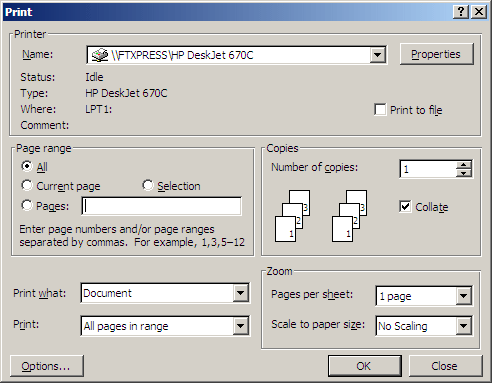
A dialogue box where it’s obvious what you can click on, all the information you need is clearly displayed, and all the keyboard shortcuts are visible? Some UX designer at Microsoft will be having a fit. Better convert that all to React and hide most of it behind a hamburger menu at once; this isn’t how things are done in Windows any more.
I still miss the XP Control Panel. We didn’t know how good we had it
… and last but not least, a dialogbox where everything works and the print actually get printed when you click print. Yup, not the MS way anymore
Ah. I miss that good ui. Such a good ui. There’s a reason it’s still around on all the utility backend and admin stuffs.
Since the page and the article have multiple dark patterns, here’s the meat of the story:
Microsoft is changing the way it handles printer manufacturer drivers in Windows 11, which could affect people using very old printers. But you can get around it.
The tech giant is phasing out support for older, legacy printer drivers, known as v3 and v4 drivers. While the move will likely affect only a small number of owners, it’s worth checking whether you’ll be affected.
Got an older printer? Here’s what you can do
If you have problems, you can still download the correct driver directly from the printer manufacturer’s website. Go to the official website of your printer’s manufacturer and search for your model in the Support or Drivers section.
It’s worth noting that after a fresh Windows 11 installation, or when setting up a new user profile, Windows may install a generic printer driver instead of the manufacturer’s own version. Basic printing should still work, but some features such as scanning might be missing. All you need to do is go to your printer manufacturer’s website and download the correct driver from there.
Beware of dodgy drivers
At Which? Tech Support, we’ve seen an increase in people being charged for drivers. You should never pay for a driver as they are free from the manufacturer. Always go directly to your manufacturer’s website so you’re not at risk of this.
Changes to printer drivers can cause some confusion, and scammers often take advantage of that. For example, watch out for any pop-ups that claim you have a ‘driver error’ and ask you to call a phone number – this is a common scam technique.
For peace of mind, use the official support pages for these major brands:
Microslop gonna Microslop
Microbloat is deprecating something? That’s new. Do AI next.
If AI were causing real automation improvements and productivity gains, shouldn’t they be extending support, if anything?
So printers which never worked will stop working? Ok 🤷
It would be news if Microsoft would add printer support to windows for once.
Wrong, old printers are the only ones that were built to last and are easier to maintain.
Yeah. I got a free HP Laserjet 4 a few years back. 4 pages per minute, smelly (ozone, I think), curled pages like crazy, was fucking huge, no duplex or networking. Actually, if I remember correctly it was parallel only, no USB. Completely repairable though.
Now, for my B/W printing (I also have a Brother color laser, and an Epson A3 inkjet because reasons) I have a tiny Brother laser, that prints something like 16 PPM, duplex, with dirt cheap compatible cartridges. Go ahead and get a LJ4.
I imagine that if you have some obscure specialized printer this may be a problem, though.
The image looks surprisingly happy at that news
They seem to be contracting on all fronts except their datacenters. With a little luck, Micros**t will die out with a huge bang in a few years. The world will instantly become a better place for everyone…
Instantly?
Hospitals, telecoms, schools, universities, research labs the world over would be left without security updates or tech support. Businesses would crash out, access to everything from Sharepoint to Outlook to Entra ID SSO cut off rendering tens of millions unable to work and likely furloughed or redundant.
Enjoy your accelerationist fantasies if you like, daring to assume that the void would be filled by fucking Linux Mint or something and not literally just Apple. But the idea that it would be instant is even more unhinged than the average .ml stammering about the misunderstood virtues of Russian anti-Imperialism.
Hopefully be a massive teachable moment to humanity?
deleted by creator
An operating system cannot brick a piece of hardware. This seems like a PEBKAC issue honestly.
An operating system cannot brick a piece of hardware.
Sure it can. It may not have in this case, but there’s plenty of hardware that can be bricked by an OS.
deleted by creator
deleted by creator