

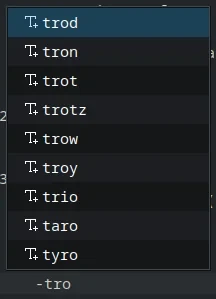
that’s how it worked in the last couple distros i tried but now on kubuntu it shows all kinds of (unhelpful) words. i tried disabling “keyword completion” but it did not change this behavior.
thanks for reading!
edit:
here is what it says under “components” in the “about” section:
Kate: 25.08.1
KDE Frameworks: 6.17.0
Qt: Using 6.9.2 and built against 6.9.2
Ubuntu 25.10 (Wayland)
Build ABI: x86_64-little_endian-lp64
Kernel: linux 6.17.0-14-generic
edit2: i tried upgrading kate to the latest (beta?) version 25.12.2 but now it’s not even launching…
Well, you certainly have more of a dictionary available than I do. For me, it looks like this:
(Which, again, might actually be broken on my distro by excessive minimalism. No idea.)
My About→Components section in Kate says this:
You could try setting the “Default language” in the Spellcheck settings to something else and see, if it still completes the same words, just to try to find out whether these dictionaries are connected.
But yeah, might be worth filing a bug report with the Kubuntu devs. At the very least, it would tell them this behavior may not be wanted by everyone, if it is intentional…