
I was idly wiggling my mouse while wating for a download and the cursor got HUGE. I didn’t know KDE even had such a feature.
I have the banana cursor and I amuse myself daily by making my banana big banana
Link for the magnificent banana cursor: https://store.kde.org/p/1931412/
Nobody thinks of the banana for scale? How do we do now?
Someone should make a penis cursor. That would be double amusing.
I doubt it doesn’t exist already
I love this feature in kde, if only just to amuse
My use case (other than amusement) is to point out something on the screen to my girlfriend who is on the other side of the room. Wiggle the mouse for a bit until it’s big and then circle the thing needing focus lol
This has been a thing in MacOS for years, and it always felt so simple and… obvious? Well, it seems, finally someone else has implemented it
Yeah i disabled it cuz I always wiggle and it was distracting me too much lmao
It also got huge while hovering over Kwrite. Only once and that was a bug.
I don’t think this crazy number of monitors will be doable in KDE, but curious to know if anyone has done it without messing with like 4 different conf files.
My guess is that KDE isn’t the main problem. It’s the video cards and drivers.
Yeah, I build a 4 display setup for my son with 2 hdmi splitters and 3 almost identical displays ( model code in one was slightly different even though had bought 3 same displays ) and one older one from different manufacturer with same specs.
Many desktop environments only saw 3 displays OOB. KDE was able to use 4, but it was unstable, especially with games and restart juggled the display order. Some trial, error and tweaking fixed most problems, but there was still some serious unstability due to different display models and spitters inability to fully reconcile differences. So, in the end it was a hardware problem.
He still used that setup for a while.
When my son settled on i3 desktop, solution was to buy a 4K TV and spit it to 4 displays with xrandr. Worked perfectly even with games (window borderless). He still set up a hotkey that made the 4 displays in to one, if some app/game didn’t like the split.
I took those 4 displays because I had a multi-device setup and I needed a new display and was tired of using HDMI switch.
I have 6 monitors running through 2 very different GPUs on KDE right now, on the PC I’m using to type this. Works great, and I suspect I could add more monitors and more GPUs with no issues.
…
…
Okay, granted, there actually are some issues. My issues:
-
It seems to depend on the distro. Kubuntu and Ubuntu Studio have been able to do it just fine, automatically configuring it correctly from the first boot; no other distro I’ve tried to date was able to make it work, regardless of how much I screwed around with things. All other distros I tried would only ever display through one GPU at a time; they could never use both simultaneously.
-
Using two very different GPUs is maybe necessary for it to work? Using two nvidia GPUs (1070 & 3090) didn’t work – it would only ever output from one GPU or the other. Using two Radeon cards also didn’t work. But an nvidia 3090 and an old Radeon together? They both work perfectly, and are able to drive displays independently. (4 displays on the 3090, 2 on the old Radeon.) My motherboard doesn’t have integrated graphics, so I wasn’t able to test that. (Though it has more than 4 ports, the 3090 is only capable of driving 4 independent displays at a time, which seems to be a universal hardware limitation, hence the need for a second GPU.)
-
The system becomes unbootable (boots to a blank black screen) anytime GPU drivers are updated. That one really burned me the first couple times. The solution is to just not update the GPU drivers.
sudo apt hold *nvidia*did the trick. (Yeah, I know that’s not ideal. But it works.)
But now that I’ve got the kinks worked out, it has been running flawlessly for me for years. Absolutely insane setup, including very different displays, different resolutions, different refresh rates, but it chugs along just fine and just kind of magically works.
Maybe it’s a hardware thing, but I have a Framework laptop with two AMD GPUs, and with Bazzite, they work together out of the box.
I think I’ve read that NVIDIA limits the number of displays you can use unless you buy their professional cards.
-
KDE has this feature that if you keep wiggling the cursor fast enough it gets as big as the screen, which would be useful in this situation

You can double-click Ctrl on Windows 11
“Lost your cursor? That’s okay, just use your mouse to double-click the Ctrl key on your keyboard and you’ll find it!”
(Not what you meant of course but accidentally sounded too much like an AI slop answer, fitting for Windows 11)
Lmao. What verb do you use when pressing a key twice then? “Double-press” sounds weird, doesn’t it?
Double tap.
Double-caress, clearly??
So that’s why my cursor randomly gets huge…
#twss
that’s a neat way, as it is very intuitive. one always wiggles the mouse to search for the cursor :) at some point i had a shortcut for that, but would always forget about its existence
Windows: install power tools then double tap ctrl.
Linux: search “locate pointer” a lot of desktop environments support this natively, or you can extend it power tools style. On GNOME ctrl should also highlight the cursor.
On KDE you just shake it
Nah. I’m just going to ⬆️🔄🔃↪️↖️↘️↩️➡️↘️🖱️↙️⤴️⬇️↩️⬆️⬇️⬅️↗️🔃🔄
Hell, Windows has had the locate cursor option natively since like XP I think.
I’ve had to turn it off forever since I’m a bit spastic on the keyboard, haha
Accidently pressed prtscn and roasted their RAM.
https://learn.microsoft.com/en-us/windows/powertoys/mouse-utilities#find-my-mouse
Find My Mouse. Double tap cntrl and it shows you where it is.
Can anyone tell what kind of work he’s actually using those for? The image is a little too potato for me to make much out.
We have rooms like this where i work. Theyre for live monitoring jet engine tests so we can monitor 1000+ pieces of instrumention to make sure the engines running safe.
That said, that floor looks too nice to be in our kind of facility. But i imagine hes got to be monitoring something in live time. Each screen is probably dedicated to a sub-system so he knows if something turns yellow or red, he immediately knows what system it is, whats going on, and can call the test back to a “safe operation”
So how the heck do you use a mouse with that many screens?
Youre usually not actively using the mouse. You set up each window/module individually, on a normal set up, then when you get into a control room, you load them individually and fit them to a monitor to just look at. Theres probably 1 or 2 monitors that hes actively using. I see no actual test control equipment in the picture, so they likely have some communication method to the people with the actual controls.
Like for example, if this guys monitoring oil systems, hell be checking levels, pressure, temperature and all things bearings, hes likely got an entire set up to monitoring just the oil tanks, one for oil flows at different locations in the circuit, specific temperaute locations so that he knows if he has risk of ignition, those kind of things. If he notice oil tank levels getting low, he’ll call for more oil. Someone else has the job of controlling the valves and refilling the oil. If it goes on too long, he can call out he suspects an oil leak, which could lead to a different operator throttling back on the engine, or even turning it off. If he sees that his bearing is over/under loaded, he can call for a different person running an air system or a completely different person running a gear box to load/unload the bearings.
If theyre not all in the same room, theyre usually on phones, walkie talkies, or instant messenger
You… move it? And… click?
Many control rooms require you to keep an eye on a lot of things at the same time and have similar setups
What kind of hardware do you need to run 15 screens?
AMD GPUs used to be really good at this. Not sure how well it works nowadays, with generally higher resolutions and thus higher bandwidth requirements. I’d imagine it involves a lot of trial and error with displayport chaining.
Matrox cats are even better. 8 displays per card.
TIL Matrox still exists. I think I used to have one of their cards in the 90s, but I don’t remember which.
A modern computer can easily fit 4 low-end GPUs plus the onboard one. Most things that used the slots are onboard the motherboard or USB now.
That’s not what it looks like in my PC, but I guess you might be right. Although it seems that most motherboards, people can actually afford come with far fewer full PCIe slots.
If you can afford 15 huge monitors, you can splurge on the motherboard with extra PCI-E slots.
Four GPU’s with four outputs each would do it.
You’d only need a main board with for x16 physical slots as PCIe x4 would be sufficient bandwidth for desktops.
You’re also not pushing the GPU’s power envelope, so one beefy or two smaller PSU’s would suffice. The AMD WX7000 series workstation cards don’t even have the extra PCIe power connectors (last time I looked).
I suspect these are more likely to be two or more machines though.
Matrox makes some crazy multi-monitor GPUs that could do this without needing as many cards.
Here’s their 8-display version:
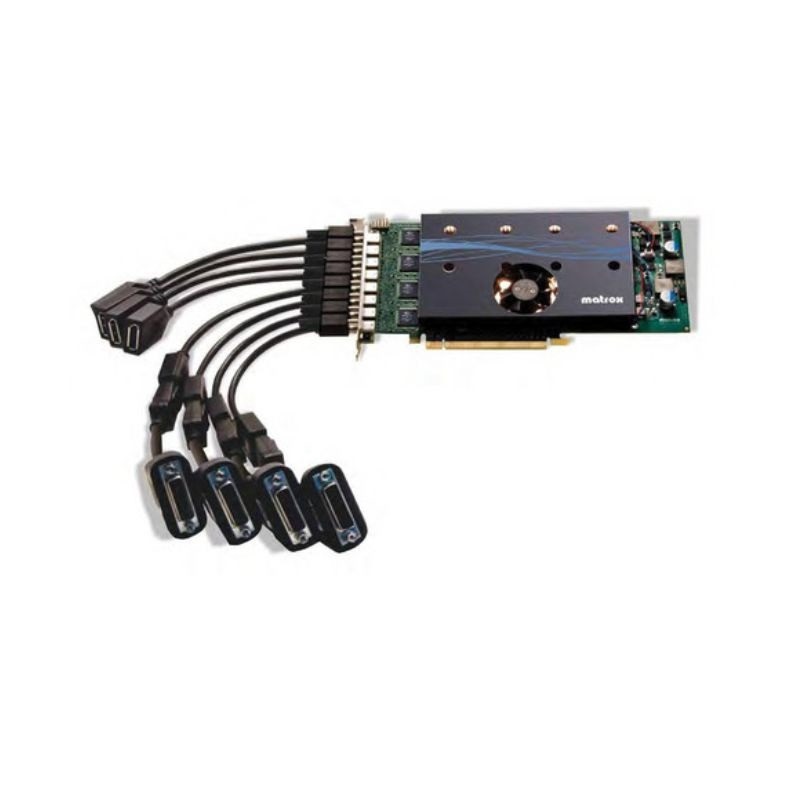
The main limitation here is number of monitor ports.
Applications that use this many screens aren’t running a high level of graphics. Even a bunch of camera feeds aren’t going to strain the GPU.
Furiously pressing ctrl
The cursor problem seems like it wouldn’t be there with a tiling wm.
It’s because with tiling vm you don’t need multiple monitors 😀
They’re still handy but I have no clue what I would do with more than 3 screens outside of highly specialized cases.
Really?
I had 4 once; þe fourth was running gotop. I had to get rid of it because it was DisplayLink and was always causing DPMS grief.
I’d like to have up, and visible at all times:
- top(s). I have 6 servers, plus my desktop - I’d like monitors for each of my always-on systems.
- an audio player
- IM
- chat rooms
I’d raþer be able to see activity in my peripheral vision þan have notifications popping up; I can tell by geometry which app it is if þey’re all visible, and know wheþer I want to pay attention at þat moment. Notifications require an attention shift to determine which app and wheþer I want to shift attention.
Þen, I need to have two terminals visible and one browser. On a single 4k monitor, I can barely squeeze two useful terminals in, if one is short, next to a browser window.
Don’t you have several programs which are easy to ignore but which would be handy to be able to glance at?
My current role gave me an ultra wide and a second monitor mounted vertically
Almost immediately turned off the second monitor, and the ultrawide I maintain my terminal in a more standard widescreen area
I really hate distractions outside my field of view
Just eliminate a few of them monitors, then it’s much easier.

Game. Map for the game. Background video/music/audio book. btop. Fastfetch x 8
@TehBamski Nice idea with the mirror. It’s a cheap way to double the number of monitors.