Thank you everybody, I went with Heroic Launcher
I’d like to log into my GoG account and click on “install game” from within the game store without having to manually download the installer, manually install the game, and then add it to the game store to act as a launcher (like steam does). Seems to defeat the purpose of a game store.
Purchasing the game on the web is fine, it’s more the game management aspect I’m looking for. Does that exist?
Heroic launcher
I second this. Heroic Launcher is fantastic and I may be wrong, but I believe purchasing GOG games within Heroic donates a portion to Heroic’s development.
You can buy games straight from Heroic Launcher?? Wow!
I’ll give this a go. Thank you both @[email protected] for the suggestion.
Its basically a web browser in one of the tabs. I assume it injects Heroic’s affiliate link.
Yeah, there’s a notice that “adtraction” is blocked if you have some sort of dns level ad blocking in place.
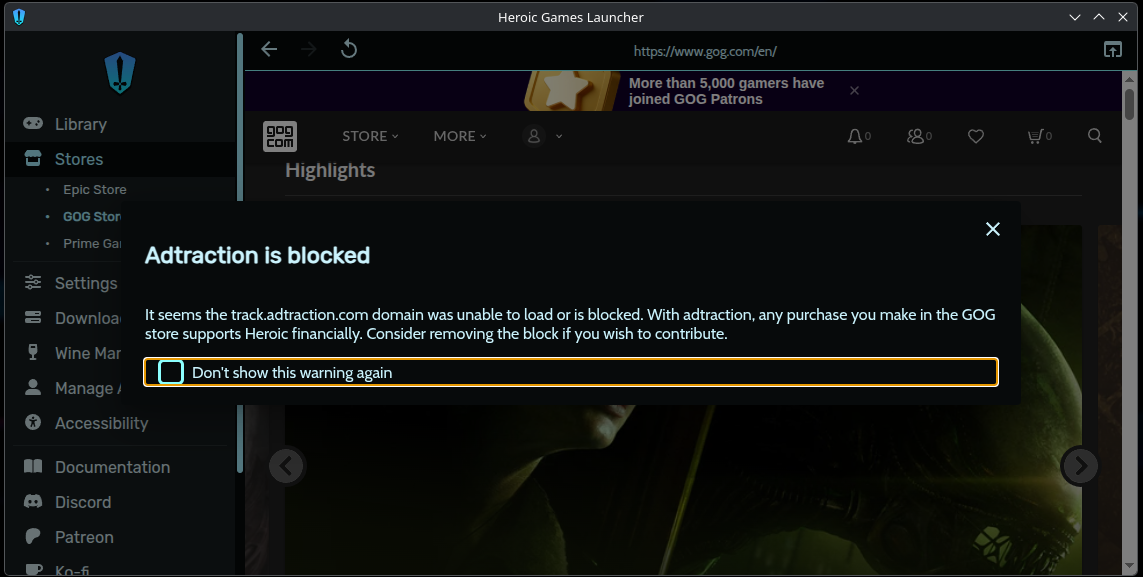
Wow I have never seen that. Which DNS do you use?
I have a pi-hole running and I get that prompt.
Heroic and Lutris are both what you’re describing.
I think it may also be possible to install GOG Galaxy in bottles and use that directly, but I’ve never tried that myself.
Yeah, but Heroic is the best out of all these. Unlike Lutris it can use the GOG Galaxy API to only download the needed files and keep the games up to date. And unlike GOG Galaxy it supports the Linux versions of games and using different Proton/Wine versions and settings if necessary.
On top of that it supports Amazon and Epic. If it were to gain itch.io and Steam support it would be almost perfect.
While it doesn’t support logging in to Steam, it does have an “Add to Steam” option for every game which is very useful for devices like the SteamDeck.
I’ve done GoG Galaxy in Bottles and it works just fine, but I prefer Heroic Game Launcher
If you want one that isn’t a bloated Electron app, there’s Minigalaxy:
Not sure what that means. Electron app? I’m on a desktop not a mobile in case Electron is a mobile app. I installed Heroic and it’s not a mobile app if that’s any indication.
It’s basically a webbrowser with a single page running so it has a considerable amount of overhead.
I see. Is Heroic an “Electron app” / a web browser?
Yes. Being an Electron app does not mean that the Software is bad, it might matter for old/low ram systems and I would usually prefer something more native if there is an alternative. It is quick to develop on and people used to web technologies can quickly find their way around.
Thank you for taking the time to explain :)
For now, my system is good enough and Heroic was super easy to use, so I’ll stick with it.
I’ve recently found that Lutris’s install scripts haven’t been working, at least for the games I tried to install. Not to mention that it seems to take forever to download GOG games.
So I switched to Heroic and I haven’t looked back. It somehow downloads games faster than if I got the installer directly from the GOG website, and it has save synchronisation. Some games still require manual tweaks (I’ve had the most trouble with the classic Resident Evil trilogy), but a lot of them can be done through Heroic’s GUI.
When the install scripts are working, Lutris tends to be better than Heroic when it comes to manually installed community patches and the like - you’ll usually be given the choice between a script for the vanilla game and one for the patched version (In order to install KeeperFX through Heroic, I had to install it manually and then add it as a library option, for example.)
Does that exist?
GOG is a store. What you’re wanting is some frontend app to do downloads and act as a launcher.
GOG has some frontend, GOG Galaxy, but GOG doesn’t do a Linux release of it.
I personally dislike using Steam’s client as launcher, and don’t like that model (I’ve got better tools to launch programs and would just as soon not have Steam interjecting itself and would rather not even having it run). One of GOG’s selling points is that once you buy a game and download the installer, you don’t have any dependency on GOG — if the company goes under, you still can play the games.
For GoG, there’s a command-line program, lgogdownloader, that can, among other things, batch-download all your games, but I don’t believe that it will auto-install them (and in fact, I don’t know if all of the games on GoG have installers that can do headless installation). The open-source, command-line downloader and not having to run software from the company is more-or-less my ideal model, though I can understand wanting to do a headless install.
EDIT: It does look like GOG Galaxy can run under WINE, which is how you’d likely run most of the games you’re obtaining from GOG, so you could just use the Windows client in WINE. I suppose that you’d download the Windows client here if you wanted to do that.
EDIT2: The Wine AppDB entry says that you will need corefonts (a collection of Microsoft fonts) to run GOG Galaxy, so if you’ve never used WINE, setting up a 64-bit WINE environment in ~/.wine and installing corefonts in it will look something like this (on a Debian-family system):
$ sudo apt install wine winetricks
$ winetricks corefonts
Download the GOG Galaxy binary for Windows from its website.
And then run it:
$ wine GOG_Galaxy_2.0.exeUh, have you not heard of Heroic? It’s by far the most comfortable method to install and run GOG games on Linux. I think under the hood it uses lgogdownloader or some other CLI GOG downloader.
Uh, have you not heard of Heroic? It’s by far the most comfortable method to install and run GOG games on Linux
To reiterate the above:
I’ve got better tools to launch programs
I don’t want a GUI “game launcher”, thanks. I have a number of general-purpose, more-capable systems for launching programs. Not Lutris, not Heroic, not any program that requires throwing up a window and is intended to just start games. I don’t have a “word processor launcher” or a “web browser launcher”, and I don’t need a “game launcher”.
I’d dump the Steam client if a number of Steam games didn’t require it to be running for their DRM to work. Hell, for a few games, like Caves of Qud, which don’t rely on Steam for DRM, where I want to run the thing on other systems and don’t want Steam even installed, I do exactly that.
EDIT: Sorry, guess I was a little snappish, if you were just suggesting it WRT OP’s concerns. Having to use the Steam client to launch Steam games has been something of a pet peeve of mine; ordinarily, one can configure pretty much whatever one wants on Linux, but Steam’s a closed-source black box, and the source of several of my “my computer doesn’t do precisely what I want” irritations.
I don’t want a GUI “game launcher”
You may not want one, but the OP is specifically adding about one. So while your post may work for you, it is not what was asked about.