We used to have time to eat serial, but now everything has to catch the bus.
still better than fake “i have prepared every port that anyone has ever seen for breakfast this morning, but the kids are only grabbing one measly USB C toast as they head out with friends”
How else can you exposition that they’re a busy person living a busy life that doesn’t have time for the plot that’s about to happen to them?
All devices now have chips that do a handshake with the charger, exchanging information about supported standards and charging using the best common option. So I charge my prohe with a 90W laptop charger, even when it is unable to use the whole wattage
The point is that it is unclear which USB C can do what.
What’s the solution here though? I am 100% unwilling to go back to non-compatible and separate chargers for electronics where not completely necessary. It’s awesome taking only my laptop charger with me and being able to charge all devices optimally with it.
I think the complaint is more about the ports on computers, and the answer is for manufacturers to label the ports and for users to read them.
That last part is admittedly hard for a lot of people (myself includes at times).
The issue is, that’s not even enough! For example, the Dell 120 W laptop charger only supports 5V/1A or 20V/6A output, so phones will mostly charge at 5W because they dont support 20V input. Then there’s all the different charging protocols… Oh boy.
I’m not sure how your example is “not even enough”? If the charger is labeled as only having a 5v/1A and a 20V/6A profile, then where is the problem?
The problem is that the average consumer will have no idea what those numbers mean. If it was as simple as “this charger can output up to X watt”, labeling would probably be fine, but as soon as it gets more complicated than that, you’re beyond what most of the population is able and/or willing to deal with
Yep! In this case, you may go “Oh, 120W is more than my phone’s 20W charging speed, so it’ll be fine,” only to find out that because it’s only available at a voltage higher than the phone supports it’ll be a very slow charger. I don’t think most consumers want or care to look at what charging profiles their phones and chargers support.
Well, I’m all for universally easy things and a consumer not being stressed, but if we really got to the “I don’t get basic numbers” territory, then go learn some school physics, and maybe that Volts is the pressure in the pipe, Amps is how fast the water flows through it, and Watts is just pressure times flow rate - it’s that simple. Go and fucking learn what is what, there’s enough information in my comment alone.
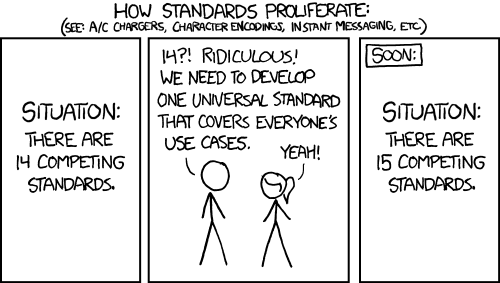
there are too many standards.
for most part, rather than all that mess, maybe just stamp the cable/port with max wattage and max speed. So rather than worry about what standard am I using, I just know what I have and what goes where.
Right now, it looks like it’s mostly usb-c everything (with “the more watts, the better”, and the apple stuff being generally compliant becaus of the legislation pressure, but really not because their stuff is (intentionally) not completely working the same way. There’s also a minority of “just shitty chargers and cables”, but I’m speaking of brand-name space
At least thunderbolt you usually get an icon plus number. Though most devices don’t label the ports.
All the other USB standards are confusing as shit.
It’s the USB Implementers Forum’s job to standardize these things, and they’ve just been doing a bad job. The naming scheme is a mess and the requirements are so loose, manufacturers just kinda hit whatever specs they want.
They need to set specific comprehensive list of technical requirements for each class of USB-C cable and port, reduce the number of classes (no more than 3-5), and make the naming scheme and logo design of those classes very clear and obvious to the less informed.
There’s supposed to be specfic icons the manufacturers can print next to the port. It’s not perfect, but at least it’s easy to know at a glance eg. whether it can double as a displayport or not and whether it can double as an input charging port or not.
It also doesn’t actually matter at all. You just plug it in and it works. How well it works really doesn’t matter in 99% of cases.
And as time goes on the absolute minimum you will come across only goes up and never doesn’t work.
So unless your casing the absolute newest feature set where you absolute need say thunderbolt 4 not 3 or 2. Then it doesn’t matter.
For wattage you can just read the brick. Its required by law to have that information right on it. For the cable if it doesn’t work go but a new cable and retire your old one. Iv had two replace my main USB c to c cable once ever because it wouldn’t handle the wattage i needed it to.
Its just a seriously non fucking problem for 99.99% of people.
The minimum feature and watt spec of every cheap piece of shit is well past the point normal people care.
Half the cables I have will charge a phone, but will not pass data. There’s no visual clue, so when I want to use a usb mic for example, I have to try cables until I find one that works.
Wattage is not the issue.
All mine are either labelled such that they are differentiated clearly from other on-device ports, identical to all others, or they are the only port on the device. While i could complain about the specific symbols and lack of standardization there, I have one singular device i care about fast charging with. So it’s rather moot once i identify the high power port.
More USBC plz. Looking forward to the 230V standard.
And why exactly would that matter? Your devices automatically negotiate to the most effective alternative. If you want to streamline it, you read the manual? FWIW I’ve never had a device with completely unlabeled ports…
Cable only charging, only this, only that speed.
Device A only this, only that.
Device B see A.
No 5 kOhm resistors on the CC pins? Not even 5V charging works for C->C. I love USB C, absolutely do not get me wrong, but holy fuck this willy nilly bullshit destroys it. Just make USB3, then 4 years later etc. with very specific things it must be able to do and mark all devices and be done with it.
Sure but to be fair the vast majority of devices charges fine with the baseline 5V/1A, even if a bit slower.
Exception is larger devices like laptops but I can’t say it’s a huge problem as their larger chargers are distinct enough
“a bit slower” can mean multiple hours even for a regular smartphone, or a full day for something like a powerbank. That can easily catch you out if you expect the device to fast-charge as usual. It works, but it’s far from ideal
Except that C to C only works when the receiving device has at least the required 5 kOhm resistors on the CC pins. Otherwise nada. But guess what? Lots of shit does not, so only charges from USB A.
I’m having some cheap devices with USB C plugs to charge, that stubbornly refuse to get charged with “better” cables. Only the real cheap ones work.
Probably because some pins must not be used or something, but it really sucks needing a separate cable around just for those devicesI get, that not every cable or device can support fast charging, but the other way round should at least work
Chargers are also required by law to label their wattage and amps on the device.
Your cable might not do the highest wattage but your laptop will tell you if the cable isn’t enough when you plug it in… And why don’t you have the cable that came with it then? Its just a non problem.
I mean, it’s not 20 of them like the picture suggests - it’s like 2 or 3 depending on what yoou have. And I have laptop chargers everywhere, and a good powerbank, so I’m covered. And I also have a GaN universal hub with several plugs, so I can plug in US or EU and have a lot of watts coming onnthe other side. So I feel like the chargers war is over and now we can just use stuff.
On the other hand, I have a USB-C charged laptop, but it only accepts one specific spec of 45w, and one specific spec for 60w. This means that 90% of usb-c chargers don’t work for it, including chargers that support 45w or 60w charging. This means that even if you buy a charger with the right wattage, its effectively random whether it will work or not.
You just note down the company who delivered the idiotic product: next time your options for purchase are narrower, but it narrow the chance to buy products badly designed.
Just because some companies sells USB butplugs it doesn’t mean USB standard is necessarily a pain in the ass overall.
I have a fucking thinkpad that does not follow the USB PD spec!
The thing has only type-c ports, the thing is relatively recent (2023), the thing accepts 140W via type-c, I never bothered to check the actual specs and assumed PD 3.1
Turned out that no, this is not PD, this works only via proprietary power brick that outputs [email protected], that I didn’t get as I already have a bajilion of PD 3.0/3.1 power supplies at home.
back of the device

Just because some companies sells USB butplugs it doesn’t mean USB standard is necessarily a pain in the ass overall.
No, but it does mean that the USB standard allows for being a pain in the ass, compatibility-wise, which kind-of defeats the point.
Why did you not use this opportunity to name and shame, to help others avoid such evil manufacturers?
I have different work Thinkpads from 2019, so probably the first one was 2018 or 2017 generation. And they accepted whatever laptop usb charger (ok, most of them were also Lenovos, but some generic stuff our IT was ordering from Amazon as well)
My current T14 works with my AliExpress 120w powerbank.
Probably good to rely on brands who don’t mess with standards
While that is mostly true, I do have several USBC devices that refuse to charge with a name brand 65 watt charger I have, but they just love the cheap dollar store 5 watt versions.
I have a few devices that have usb-c but only charge off an A-to-C cable. Presumably no charging circuit to negotiate with usb-C chargers.
All it would have taken are 2 resistors…
Oh, my powerbank charges my laptop through the high-power usb specifically marked “PD”, and that usb doesn’t charge my bike lights - the other “usual” 15w ones do. And many usb hubs also have something like this written on them.
What I’m saying is that I’m only against the picture showing 20 Usb-c ports telling that they are all different. I would divide slots and cables in 3 groups:- “oh, this one doesn’t show fast charging”,
- “yay, this one supports fast charging”,
- and “this thing has “100000W” written on it and it charges my laptop”.
And you usually can easily distinguish them. Like, a thin cable probably won’t do the fast charging thing
That’s right, it goes in the USB-C hole!
I heard the voice
Slow charge speed detected.
Hooray for standards!

I hated DVI more than I hated VGA, somehow a pin will eventually bend.
You haven’t known hate for a display connector until you have experienced the DMS-59:
https://en.wikipedia.org/wiki/DMS-59
Same size as a DVI connector, double the ammount of pins, with twice or thrice the weight hanging off the end
I remember that bastard.
Remember, I have seen those things out in wild as recently as 5 years ago.
I have seen this weeks ago.
And I have seen one active DisplayPort to DVI adapter with an additional USB A cable to power it.
Just looking at it made me angry thanks!
Lol
Then you have the graphics connector that I absolutely hate.
DMS-59
Look at the DVI-D Dual Link, that has 24 pins and a blade. DMS-59 uses the same size for the connector, but removes the blade and fits 59 tiny pins in the same space.
It then uses a heavy and bulky splitter cable that puts strain on the connector. The splitter is then connected to two DVI or VGA connectors, adding even more weight and strain on the DMS-59 connector.
It is an idiotic standard and made my love for DP grow strong. Especially once I learned about MST.
I love DP
To bring it back to display connection standards, I’m personally a big fan of DisplayPort
I remember that bastard.
DVI-I cord with a DVI-D computer? Absolutely not. It’s got these 4 extra pins that you’ll ruin if you try.
I spent two hours today explaining the difference between USBC plugs meaning USB 3 — USB 3.1, USB 3.2, and thunderbolt 4,and the differences between all of that, and how they would affect the performance when my buddy was shopping for an external drive bay enclosure. (You bought a server with TB4 ports, get that TB4 enclosure! Those drives are set up in parallel, so let’s eat that speed!)
I literally had to explain the differences to him for two hours. Not because he was stupid, but because it’s absurdly complicated.
Tell me about it. I’ve been trying, unsuccessfully for over a month to find a proper USB-C adapter that will give me both USB-A 2.0 and a 4K 120Hz output from my phone via HDMI. (It has to be USB 2 because 3.0 and up ports steal bandwidth from the HDMI port on the adapter). You’d think it would be a simple task, but even the adapters that claim to support 4K @ 144Hz still drop the connection down to 30Hz every time I increase the resolution beyond 1440p. Hell, at this, point, I’d just be happy with 60hz.
All I need is a simple adapter that will allow me to use my phone as a PC at a decent refresh rate, until I finally find the time and patience to sit down and figure out why the hell my PC won’t POST after I replaced the CMOS battery. Yet this has proven to be an impossible task.
Does your PC have DDR5? Do you get a black screen and spinning fans when you power it on? If so, let it sit powered on the black screen for literally 30+ min. It may be memory training and they, for some absurd reason, give zero indication they are doing so.
I’ll give it a shot but status code 15 is for memory training, and it gets past it just fine so IDK.
OK, so my first reaction to reading your post was “what the fuck”, and my second reaction was “there’s gotta be a better way to try to do this”.
What are you trying to do? Because whatever it is, you’re trying to do, I think the best way to solve your problem. Is to rethink your approach. There’s gotta be a better way to go at this.
I’m a tech guy (I’m sure that applies to pretty much anyone on Lemmy) so maybe an outside view will help you solve this problem
Again, what are you trying to do? What problem are you trying to solve? Because, from what you’re telling me, you haven’t been able to solve the problem, so maybe trying to come at it from a different angle will present you with different solutions.
I get that you’re trying to output 4K video from your phone, but what are you trying to output that video too? And is outputting video from your phone the best option? Can you output video from another device to the end device?
What is your total solution here? What is your end solution? What is this all look like in your final video set up? Is there a better solution than using your phone?
All I want is a simple USB-C adapter with these ports:
- A USB 2.0 port (or two) so that I can connect my wired mouse and keyboard
- A HDMI 2.1 port that supports 4K 120Hz
- A USB-C pass-through port charge the phone.
Modern Android smartphones will go into a PC-like desktop mode when they detect that an external monitor is connected (complete with a taskbar, and apps running in a window, just like a PC). Therefore I want to do that with my phone so that I can have something that resembles a desktop PC until I find the time to fix my rig.
The problem is that I can find no such adaptor. They all revert to 30Hz at resolutions above 2560x1440. I’ve been told that a workaround is to get a simple USB-C to DP adapter, then a HDMI to DP adapter, then just use a BT mouse and KB. I don’t want to invest in a new mouse and keyboard just for that, plus converting the signal to DP means I’ll lose ARC and then my home theater speakers won’t work, forcing me to use Bluetooth for audio as well. I don’t want to go investing in bunch of Bluetooth crap just for a temporary fix. All I need is a simple adapter that just works with my existing equipment.
Ok, I get this. My first question is:
Why?
Why is your solution for such an advanced video output setup to use your phone as an output device? Can you not use something else that is much better suited as an output device? Is that not an option?
If not, we can move forward. I’m just curious, and asking for practical reasons.
You can simply answer that it is simply necessary, and we can move on to the next steps
Well like I stated in my initial comment, my PC won’t POST after I replaced my CMOS battery and I simply don’t have the free time to tinker with it right now (Gigabyte X670E Aorus Master and it just gets stuck @ status code 7b or 99).
So I figured that I could just pick up a $50 adapter that I can use my phone as a PC in the meantime, until I get the time (and money if it’s a hardware failure) to address the issue. I just wanted a quick $50 fix that I can plug my existing mouse, keyboard, display, and home theater system into, and carry on business as usual to hold me off. Not invest in Bluetooth fucking everything just for a temporary solution. Problem is that the temporary solution I thought would be simple is actually a lot more difficult in the era of USB-C, thus proving the original point of this post. You have hundreds of different incompatible standards, all plugging into the same thing.
The fact that my comments are confusing even a tech-savvy social media network such as Lemmy says it all. Things were a lot easier in the old days. If it wasn’t compatible, the cable physically would not fit. That is no longer the case in the era of USB-C.
I think you might have to step up to like a caldigit hub
I’ll look into it; thanks.
Have you seen this one? https://www.monoprice.com/product?p_id=44467
You won’t find a “simple adapter” with those specs, you’re solidly in dock territory and you’re going to pay a lot extra for something capable of HDMI 2.1.
So your point about adapters is legit. That concept should be simple but I guess there isn’t much demand for it.
That said, I think you’ll have a much better experience with a raspberry pi. You don’t even need a bleeding edge model, I have a great desktop experience with a raspberry pi 4 model B with 4GB ram. Looks like currently $120 for 4GB ram, $170 for 8GB ram in the US. Not great prices but probably the best deal you could find and probably worth not buying 3x $40 adapters. If you need a temporary PC replacement for mostly web browsing, I recommend giving it a try.
https://www.sparkfun.com/raspberry-pi-4-model-b-8-gb.html?src=raspberrypi
Bluetooth mouse+keyboard or keyboard with integrated track pad. When you remove that as a requirement now you just need 4k120 video with passthru charging, which should be easier to find
Oops didn’t read the full comment.
I still think there’s more reusability with bluetooth peripherals than there would be with specific video cables
USB 2.0 supports the bandwidth of a 4k 144Hz HDMI signal lol?
No. You misunderstand. I need USB-A 2.0 ports on a USB-C 3.0 adapter because USB-A 3.0 ports will steal bandwidth from the HDMI port on the adapter, causing my 30Hz issue. Therefore I need a USB-C 3.0 adapter that has a USB-A 2.0 port on it for my mouse and keyboard to prevent that from happening, allowing the HDMI port to use the full bandwidth it requires to send a 120Hz signal @ 4K. Problem is that I can’t find any such adapters. But all my research says that it should exist.
Oh I think I get it.
You want a USB 3.0 hub that has only USB 2.0 ports for the peripherals so that all the bandwidth is used for HDMI and not the peripherals.
I could be wrong, but I’m pretty sure USB 3.x never supported 4k at 120hz with HDMI. Only thunderbolt could achieve this nativley.
There is a way with DP alt mode which worked using some bonus display port protocol magic which is why the suggestion is to use a DP to HDMI adapter.
Actually I’m pretty sure even DP requires at least 3.2 but I would need to check.
HDMI 4k @120Hz was added in USB 4.0 which won’t work if your phone is only 3.x.
You need a hub that supports DP alt mode so that it won’t downgrade the output: https://www.reddit.com/r/UsbCHardware/comments/1dahjah/psa_usbc_bus_powered_dock_with_dp_14_alt_mode/
I think yout phone needs to support it too though, otherwise it won’t work.
By “USB 3.0” I should probably clarify that I meant more like 3.x, or whatever standard supports the DP standard I need to achieve at least 60Hz minimum refresh rate @ 4K (ideally 120hz but I’ll take what I can get). You see, I’m old so from my perspective this USB 3+ shit still feels new and confusing for me, even having done a little bit of research. But I digress; you’ve pretty much got the gist of what I’m trying to say now.
Anyway I have a Z Fold 7 so I don’t think my phone the limitation, here. But yes from what I understand, an adapter that supports either DP Alt Mode or DSC (Display Stream Compression) is what I need. Or both. I’m still not sure, cause one such adapter I tried claimed to support alt mode but my phone still stubbornly refused to go beyond 30hz above 1440p. I’ll look into that reddit post; thank you.
deleted by creator
deleted by creator
So this one’s like fast, yeah?
lol
He came at me with “are 40 people gonna be watching the same 4K movie at once?”
I honestly had to say “probably not”
But… Still… One can never be too prepared. He paid for all that bandwidth. It’s a shame not to take advantage of it
And, really, what’s the point in even having a set up like this if I can’t transfer a 30 TB file from one drive to another in a few seconds? It’s 2026, goddamnit, how dare you make me wait!
That’s the worst part of USB, but it’s also simultaneously the best part.
You can connect a cable to that HDD, and if the cable fits you’ll get something. Might not be the best something; could be super slow and awful. But it will be something. And that’s a reassuring capability.
It rewards those of us who do our homework. I’m OK with that.
Then again, I’m one of those dorks who really appreciate FireWire/thunderbolt
Similar thing with my sister recently … her work laptop can run a monitor off of the USBC port. She bought a second monitor, and cable for her home PC, and couldn’t understand why it wouldn’t work. I had to actually pull the specs on her laptop up on HP’s site and show her where it stated that the USBC didn’t support a monitor.
HP
You know, I’d really like to say that this is the source of all of her problems, but it isn’t. USB-C is the new universal adapter for everything, but it does not preclude universal adaptability.
Whether a computer is capable of certain things or not, is something you will have to consult a specific computers tactical manual about. Just because it has a USB-C port, does not mean it can do everything. A USB-C port is capable of doing. That’s up to you to determine.
I don’t mean to sound like a dick, but…
¯\_(ツ)_/¯
To add to the situation, the age of the device alone led me to believe that it wasn’t new enough to support video on USB-C, and I told her as much from the start.
Ummm… I wanna help…
I’m just saying that alternative approaches might reveal better results.
Perhaps we should talk about this tomorrow? Hit me up later 😊
I’ve heard self-hosters say USB isn’t great for server / NAD drives long term but I don’t know where they get that. It actually sounds pretty rad to have a small server plugged into a powerful dedicated enclosure! Especially with those Thunderbolt speeds.
But wow that IS stupidly complicated. I have all those different USB ports on my motherboard IO and I get the nagging feeling I’m not taking advantage of them but also…whatever, don’t care, they do the simple jobs. Lol
USB 3.x tops out at 10 GB/s. TB4 tops out at 40 GB/s. With four hard drives, running in parallel, maxing out at 6 GB/s each, that’s 24 GB/s.
¯\_(ツ)_/¯
My favorite fucked-up thing from the past was the Macintosh circa 1990. The disk drive on this thing had no eject button – to eject a disk, you just did the oh-so-fucking-intuitive thing of dragging the disk icon over the trash can icon. But they did very conveniently place the big knobby power button for the whole computer (which looked exactly like an eject button) right above the disk drive. I spent a year constantly powering off the computer every time I wanted to just eject the disk.
At the university I went to in the 90s, there was a bank of 5 Macs. Each one had a printed label next to the power button instructing users that it wasn’t the disk eject button.
Apple has always been an excellent example of how not to design a UI.
I would love to chain up some Apple UX/UI designers and force them to watch my 90 yo mother try to use her fucking iPhone.
to eject a disk, you just did the oh-so-fucking-intuitive thing of dragging the disk icon over the trash can icon.
"Ah yes, just delete the disk to eject the disk drive. Of course!"
That’s such a crime against UI LOL.
Especially because I am sure it feels very scary to people with important data on the disk.
That would be a neat shortcut for formatting it though lol.
Exactly! I mean, why wouldn’t you think that doing that would delete everything on the disk instead of just ejecting it?
Fun fact. The ADB Apple Desktop Bus connector had four pins. Power, ground, one for the power button, and one for all other functionality. That’s daisy chained keyboards, mouses and drawing tablets. All data in one single pin. And one for the power button.
Today’s kids can’t afford a PC so it doesn’t matter either way.
But things were simpler then, you may think it was bad having so many different ports but you’d be surprised.
My experience is the opposite, no one ±5 years of me (born '90) ever had their own computer until they were in their late teens, and only a few had that then, most only got their own when they started working. Now my younger half-brother (born '12) and most of his friends have their own computer and consoles. And we’re very much not higher-middle class, many (including my family) are working class and barely scrape by. It’s just a more important thing for kids now so they save money for years and ask for all their presents to be money for it.
That’s why i said today, if you got your PC or console a few years ago you were fine.
Today a stick of RAM costs almost as much as a basic PC just 2-3 years ago.

Ahhh yeah, that’s the good shit right there.
It is still cool. Cooler because of its age. It’s the OO. They even named it something funny, tossers.
And a good place to look if you want simultaneous audio. Snyone hard of hearing can have a separate audio stream.
I thought that galvanic isolation was pretty much toslink’s only true advantage nowadays? Don’t see why you can’t have dual audio with traditional wires.
Oh, idk. Sounds like you know more than I do.
I just know. I’ve had good luck plugging headphones into them and not having the audio “switch” to that as the sole audio out and disabling the speakers.
Just a hobbyist haha I ain’t gonna try to convert you to some other standard like some kind of audiophile. If it works for you it works right
Dont forget the stupid DATA-ONLY usb C ports that dont work for your docking station monitors
Wait until they encounter the final boss
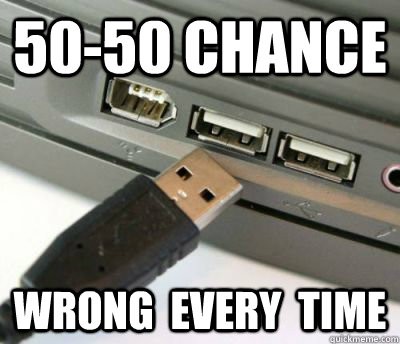
Hey I can consistently get that around my 4th try
I’m always impressed that they got this wrong even with USB-C. Here’s hoping that they finally make USB-D round so “orientation” does not matter.
what if usb-d is round but the orientation DOES matter?

I hate you. I like how you think, and I’ll love to see the trolling PoC demonstration, and we will be watching your career with great interest, but I hate you. XD
Ask the musician in your life how they feel about XLR cables.
yeah i get it but that one only goes in the right way. that’s old tech, USB-A stuff. I’m talking a symmetrical build; you can connect it in any orientation, but only one orientation works. 359 degrees of wrong.
Ive never had a USB-C with orientation issues. What am I missing?
I have heard on some adapter cables from USB-A to C, you can have the C end flipped 180 and on devices not expecting this you get a different transfer speed on the A end. Rather then build in redundancy and duplicate the transmission path they’ve just built a cheap this should go this way device.
What did I just read 🤷♂️
thats less of a USB issue and more of a cheap ass knockoff manufacturer issue.
You have to plug it either — horizontal or — horizontal (upside down). You can’t plug it / or | or \, so you have to do more twisting and bending in the dark or to reach a far / beyond-corner connector.
We’d literally and figuratively come full circle back to barrel plugs hahaha.
USB A has 4 pins. You could use a tip ring ring sleeve cable like on a headset
There are 3 ways to plug in a USB-A. Wrong, wrong and right.
Fun fact: USB A can fit in HDMI ports.
USB-C also fits surprisingly well in a USB-A socket. Great feature in the dark.
When I was a computer repair tech, I had a customer come because their USB keyboard wasn’t working.
They had the USB-A plug jammed diagonally into the RJ45 port.
Mind you, this was back when USB was still new and pretty obscure, but still. The rectangle goes in… the square hole?
Of course it does🤦🤦♀️🤦♂️
Your dick can fit in HDMI. Your paycheck can fit in.
Doesn’t mean you have to try
Problem is, I have non-tech-savvy family who do try. And succeed.
Agreed, I still remember that guy that folded a 5.25 floppy disk to insert in 3.5 drive slot
You should be kinder to your family
by putting them out of his misery.
USB, the jack of all connectors, master of none.
Blame the standards group. There are so many things USB is excellent at but they have been horrifically butchering the implementation.
They need to mandate compliance. Each accessory should support a basic level of features. Packaging and listings should include a facts table which shows the support for the various features. You shouldn’t have to guess.
But let’s talk about the features. Oh. My. God. Let’s talk about it.
USB-PD is great. But they don’t have to support it. Or they can have their own implementation which is also compliant. Or their own implementation which isn’t.
Oh, but you can connect your headphones into the USB port and play music! Well, only if the device, cable, and headphones support analog audio. Or if the device, cable, and headphones support digital audio. But if it supports digital audio, both devices must support synchronous audio. Or asynchronous. Or adaptive. And none of these are cross-compatible.
Well, that’s annoying. At least video isn’t bad. You can use it to connect directly to your monitor! Just make sure it’s DP. Or HDMI. Or VGA. Or MHL. Or VirtualLink. Only DP and HDMI are cross-compatible.
They also can support Ethernet. Or they might not. They could support ThunderBolt. Or they won’t.
They have to be at least USB 3.0. Sorry, 3.1 Gen 1. Wait, 3.2 Gen 1x1. Oh, I mean SuperSpeed USB 5Gbps. Ah, fuck, never mind they changed the standard again - USB1/2 are fine.
But at least manufacturers are happy to put the specs on their packaging and listings, right? I’m sure there isn’t any natural incentive to hide this information so they can sell inferior products.
Woah, worse than i thought.
That’s just the port side. The cables are just as fun, you have multiple levels of power delivery support, that generally don’t include data. There are data cables, that may or may not support video. Thunderbolt cables support most everything. The highest charging speeds generally require dedicated cables. Assuming everything is standards compliant it shouldn’t break anything to plug in the wrong cable to the wrong port.
Well, the U does stand for universal.
I see this as an absolute win.
Obsolete win?
If you plug in the wrong one of these, you can kill any drives attached.
EDIT: Ask me how I know. Seriously, the plugs on each end should define the pin-outs. If it fits, it should not be possible for it to destroy anything, fail gracefully at most. That used to be one of the major reasons for different plug types.

And if you use molex you can start a fire in a survival situation
I can’t find it now but there’s a reddit thread of someone who fried his Volta era enterprise GPU because dell shipped him the wrong cable that was incorrectly labeled as a Dell riser cable and not EPS (12v pins are flipped), so it burnt a hole though the card lol.
There seriously needs to be a cable Geneva convention for bs like this, it’s like the PC-building equivalent of the trench shotgun
Toslink is not dead yet. It still is the standard for sound systems. And IMO that’s not even a bad thing as it just. always. works.
Eh, HDMI is largely replacing it, even when it just carries audio and not video.
Yeah, TOSLINK is only really necessary if you’re trying to ground-isolate your audio system. Depending on how your power is set up, you can get a ground buzz between two audio devices. Literally an audible buzz at whatever your local AC frequency is, caused by a difference in potential across the two devices’ ground connection. So probably 50 or 60Hz, depending on where you live. But since TOSLINK is optical and doesn’t have a conductor to carry a ground connection between the two devices, there is no risk of a ground buzz.
It is also great if you want to split it up/duplicate it, so have multiple outputs on one source signal. Just a cheap splitter will do just fine, and I can simply only turn on the device I currently want to use without any interference or noticable delay whatsoever. No need to tell the duplicater which device I want to use. I tried the setup with aux/chinch y-cables and it was just horrible. It is even fast enough to have the TOSLINK duplicater, then a TOSLINK to chinch splitter, than use that as input for my good old 5.1 system. The other TOSLINK channel parallely goes to 5.1 headphone sender.
Idk about anyone else but I have had nothing but problems with HDMI
EARC sucks. Constant disconnects, no audio, no video, or both.
I remember having to “park” the hard drive before shutting down. I also remember the excitement when our school got PC’s with a 386 chip and an orange monochrome monitor when everyone else was stuck with green.
If it was monochrome orange, it probably was a 286. They were in my school anyway. I had a 386 at home though and it was VGA or SVGA.
My elementary school for 2nd thru 5th (1992-1995) had IBM EduQuests. Every classroom had 5 of them, and there was a computer lab room, too. Token ring network with an MAU in each room (or maybe every other room), too.
Looking back, that was insane for the early 90s.
But they all booted to some network OS. Ik 4th grade, my best friend and I figured out how to access our menu config files and edit them in Microsoft Works for DOS.
We realized we could see everyone’s menu config file, even teachers. Then we realized we could copy/paste those blocks to our configs and they’d work. So we just started adding apps and features to our account, and many of them worked. Just tinkering around.
My friend also managed to guess at least 2 or 3 different teachers passwords.
We stopped hanging out a lot in high school when he went to voc and I stayed in town…but 30 years later (from the 90s…), we are both well into our careers in network administration.
I don’t remember what we had in elementary school, but I remember the monitor had a “color” button. It worked if the program you were running was setup for it. I remember there were a few things like “Odell Lake” and “Number Munchers” - but if you turned the color button on when using the word processor, it would turn all of your text into unicorn vomit rainbow patterns. It was awesome.
In primary school we had mostly Atari 800’s with that turtle drawing game (?), but we also had some Apple 2 E’s and Macintosh 2’s.
how old ?
Early 90‘s